So you accidentally deleted some Facebook Ads.
It happens, don’t stress. We’ve all been there.
The good news is that they’re not gone forever. Here’s how to get them back.
How To Recover Deleted Meta/Facebook Ads
A caveat before we start:
Because the algorithmic learning (the understanding the algorithm has that it uses to serve to particular audiences to drive performance) is actually on the ad itself just as much as it’s on your pixel/Conversion API/campaign/ad set, you’ll recover the creative but you won’t recover past performance.
That is: if you delete your best performing ad and manage to recover the creative — the image, the video, the copy, the headline, the Collection, carousel, etc. — the ad still go back into learning. It won’t even go back into learning technically. It will just need to learn all over again.
That’s right: you’ll be on the hook for 50 attribute purchases in 7 days (assuming you’re in ecommerce) because it can get really effective again.
So while this is a good way to recover individual pieces of creative, recovering ads won’t immediately revert your account back to your pre-deleted state.
That said:
Here’s how to recover your deleted Meta/Facebook ads.
Go to Ads Manager.
You’re probably already there. Great start. If not, I get there via facebook.com/ads/manager but you’ll likely have a navigation system that works for you.
Select your affected campaign or ad set.

Note: you can skip this bit if you’ve not deleted a lot of ads in the past. If you’re not careful though you can accidentally pull up a huge list of ads from long ago rather than the ones you’re freaking out about recovering right now.
Click YOur Ad Account Search bar.
This guy in the red square.

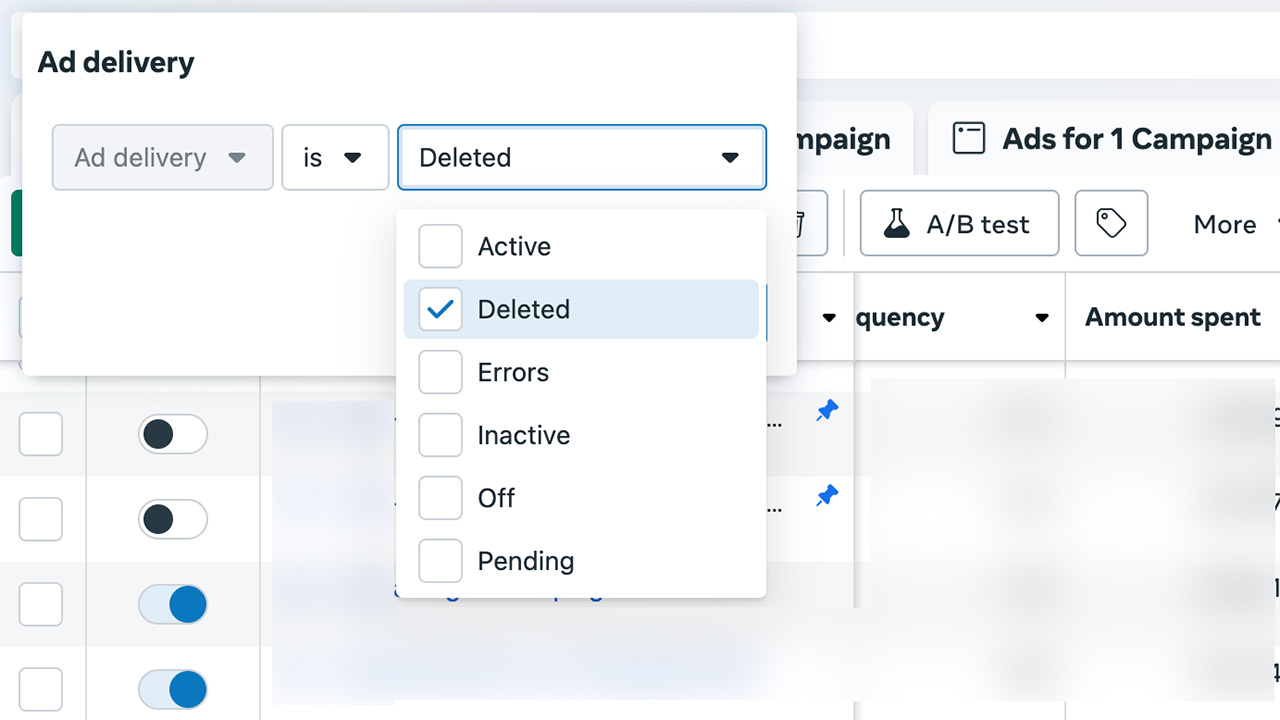
Search for ‘Ad Delivery’ as a filter.
Just start typing in your search box ‘ad delivery.’ It will bring up an option for ‘ad delivery’ under a Filter subheading. Click that. Image below for easy reference.

Filter by ‘AD Delivery’ ‘is’ ‘Deleted.’
See below.

Et voila.
Your deleted ads.
Now that you’ve found them, you can’t just turn them back on unfortunately. You’ll have to Duplicate them back into wherever you want them.
It’s this Duplication that, technically, is the reason you don’t get to keep the learnings on your individual ads. But it’s better than nothing.
Duplicate your ads.

Ideally do this in bulk but not all ads can be duplicated in bulk.
Collections, statics, videos, and custom carousels (that is, those you uploaded specific images/videos for) can be duplicated in bulk just fine.
Dynamic product ads cannot be duplicated in bulk so you’ll have to duplicate those one at a time. Arduous but not so bad.
Note as well that ads created inside an Advantage+ campaign can’t be duplicated straight out to another non-Advantage+ campaign. To fix this, remove the destination campaign and instead select a non-Advantage+ ad set to duplicate them into.
Publish your duplicated ads.

Nice work.
You’ve duplicated your deleted ads so now just publish them, update any naming conventions to remove the appended ‘Copy’ from the ad name if you like clean ad names like I do, and wait for them to get back through learning.
Tips For accelerating learning
If you really need to get these ads back through learning because they were load-bearing for your ad account or because you just want to get back to business as usual as quickly as possible, here are my tips for accelerating the learning phase.
Note: they assume you have a strong data match store for Purchases inside Events Manager, whether that’s a good Pixel setup through a developer or through the Facebook & Instagram Shopify app.
- Send an SMS to prospective buyers. SMSes used correctly are incredibly powerful. If you don’t text a lot, you could offer a small discount or incentive (10% off, free shipping, a free gift-with-purchase/upsell) to get either repeat customers who haven’t bought in a while or folks who’ve abandoned cart to check out.
- Send a strong promotional email. Again, you could use an incentive to encourage purchasers or you could just send a plain text from yourself as either a founder or a marketing manager (don’t overthink the Marketing Manager plain text EDM, they can be great sources of customer feedback).
- Bring forward a new release if you can afford to do so. Then pair your freshly duplicated ads with ‘New!’ messaging in both email and, again, SMS.
- If you have the space in your MER for the day/week/month, you could scale your budget by either 20% (non-Advantage+) or 40% (Advantage+) for the daily to get more throughput on your creative. Assuming your conversion rate and revenue per visitor rates hold, you’ll drive more conversions faster so you exit learning faster but you’ll likely face inefficiencies as, like it says on the tin, your ads have to learn.
With your deleted Facebook ads recovered, you’re back in the driver’s seat so get back to what moves the needle: more creative, stronger brand marketing, and more efficient media buying.
You’ve got this.
If you want help running your Meta/Facebook ads, get in touch.